Explore Caddie's Features
As a Delphi developer you know visual design elements can be overlooked or forgotten. Let Caddie gather the sessions you collected in Marshal and index your bookmarks and notes to let you return to the important details of your application review and inspection. With Caddie's session screenshots you will not forget what that screen looked like prior to a modification. Caddie delivers the details.
- Caddie gathers sessions created in Marshal for review offline
- Parses sessions for bookmarks and notes
- Review multiple sessions
- Review sessions from multiple applications
Caddie provides session collection and display for review after you have closed your application. Sessions are parsed for bookmarks to quickly get you back to the session after you have closed your application. Bookmarks provide a filter to your sessions2.
Post Purchase Install and Configure
Follow the steps below to begin install and source code download after you receive your license key.
Add code to a project
add source code path for TMS Web Core
- Details
- Written by: Administrator
- Category: Caddie
Install Options
- Automated install via the Deputy Plugin (preferred)
- Manual install via Download.
After install you need to enter the license code
Install via Deputy
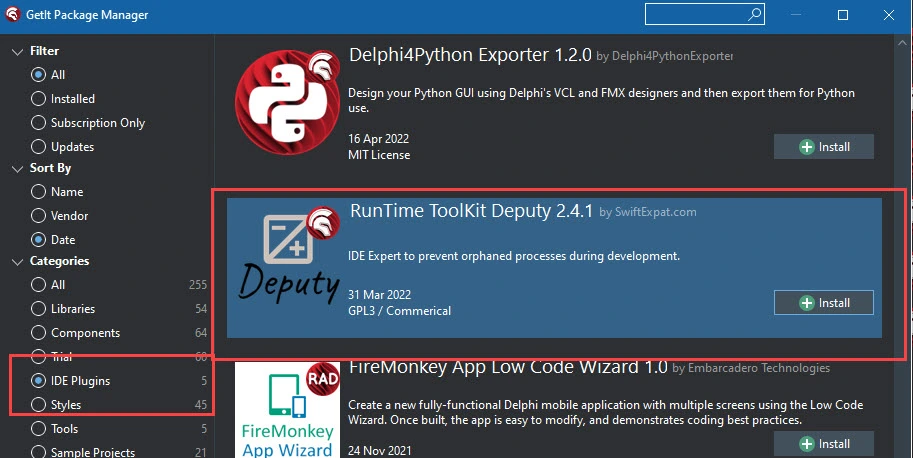
Deputy is available via GetIt in versions 11.X, 10.4 and 10.3. The category is IDE plugins.
- Details
- Written by: SwiftExpat
- Category: Caddie
2023.03.28
Required upgrade to support Marshal 2023.03.28
Added support for stream items in the session.
Fix null pointer on save license code when item was not selected.
Update Marshal to support Web Core exports.
Add process to collect exports from Web Core.
2022.10.03
Fix for animation delay in session - detail display was jumpy.
Fix for null pointer in delete session.
- Details
- Written by: SwiftExpat
- Category: Caddie